 721767d742
## Description Widget selection is driven by URL changes. This would fix browser navigation for users as they can use browser back/forward buttons to travel across older contexts on Appsmith. > Fixing browser URL navigation for widgets Fixes #19571 Media > A video or a GIF is preferred. when using Loom, don’t embed because it looks like it’s a GIF. instead, just link to the video ## Type of change > Please delete options that are not relevant. - New feature (non-breaking change which adds functionality) ## How Has This Been Tested? - Manual - Jest - Cypress ### Test Plan > Add Testsmith [test cases](https://github.com/appsmithorg/TestSmith/issues/2171) links that relate to this PR ### Issues raised during DP testing - [X] When a selected widget is below viewport and user refreshes the page, then the widget property pane is open but the page does not navigate to the selected widget https://loom.com/share/09f1eda2f02d474981a0d48e4a6419ec - [ ] Drop 2 widgets one at a time > Delete both the widgets > Now click on back button of the browser > Observe the url it shows the widget id in the URL but the canvas remains empty https://loom.com/share/53cae28a5d224e67b783c8ccf53745f5 Dev Response: This issue is valid but not a major inconvenience. We will try to track it and see if it needed to be addressed. Many other web tools do not handle such cases - [X] Canvas scrolls down when all widgets are selected. https://loom.com/share/c8a68dadcdb040779abd3a73bde2b06c - [X] Widget is not getting highlighted when added from the API editor page. Please refer to the attached video:-https://jiju8jbmwa.vmaker.com/record/IkwiAqFgafK9dVmu ## Checklist: ### Dev activity - [ ] My code follows the style guidelines of this project - [ ] I have performed a self-review of my own code - [ ] I have commented my code, particularly in hard-to-understand areas - [ ] I have made corresponding changes to the documentation - [ ] My changes generate no new warnings - [ ] I have added tests that prove my fix is effective or that my feature works - [ ] New and existing unit tests pass locally with my changes - [ ] PR is being merged under a feature flag ### QA activity: - [ ] Test plan has been approved by relevant developers - [x] Test plan has been peer reviewed by QA - [ ] Cypress test cases have been added and approved by either SDET or manual QA - [ ] Organized project review call with relevant stakeholders after Round 1/2 of QA - [ ] Added Test Plan Approved label after reveiwing all Cypress test --------- Co-authored-by: Aishwarya UR <aishwarya@appsmith.com> |
||
|---|---|---|
| .github | ||
| app | ||
| contributions | ||
| deploy | ||
| scripts | ||
| static | ||
| utils/observability | ||
| .deepsource.toml | ||
| .env.example | ||
| .gitignore | ||
| .imgbotconfig | ||
| .nojekyll | ||
| app.json | ||
| appsmith_events.md | ||
| appsmith_templates.md | ||
| appsmith-1.3.0.tgz | ||
| CODE_OF_CONDUCT.md | ||
| CONTRIBUTING.md | ||
| coverage-summary.json | ||
| depot.json | ||
| Dockerfile | ||
| heroku.yml | ||
| index.yaml | ||
| IssuesReport.md | ||
| LICENSE | ||
| list | ||
| README.md | ||
| SECURITY.md | ||

Appsmith is an open-source platform to build, deploy, and maintain internal apps. You can build anything from simple CRUD apps, admin panels, dashboards to custom business apps and complicated multi-step workflows.



Get Started • YouTube • Templates

Build Apps in 4 Steps
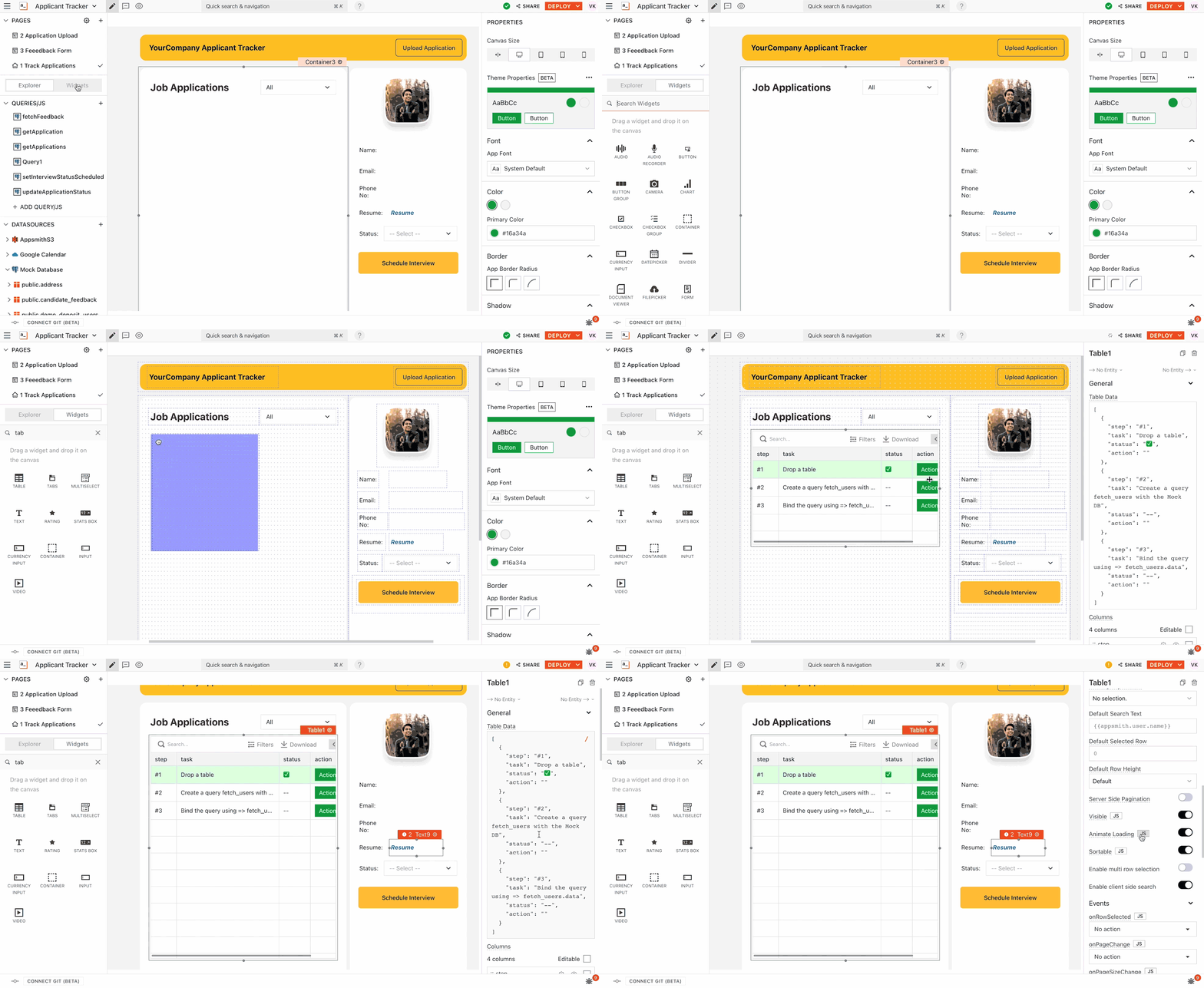
1. Build your UI
Build your UI with our drag and drop UI builder. Use 45+ pre-built, customizable widgets including tables, charts, lists, modals, forms, and more. Docs
2. Connect to your data
Connect to your data with our connectors: databases (PostgresQL, MongoDB, Amazon S3, and many more), SaaS providers (like Google Sheets, Airtable, Twilio) or any GraphQL/REST API. Docs

3. Connect the data to the UI
Connect the data to the UI by configuring the components. Where needed, you can use the Javascript IDE to create more advanced features and data transformations - the sky is the limit! Docs

4. Deploy your app
Deploy your app on our free, cloud-hosted version or to any platform of your choice - Docker, Kubernetes, AWS, DigitalOcean, Heroku, and more. Docs

Features
Appsmith makes it easy to create powerful utility applications organized across multiple workspaces. Here are a few notable features of Appsmith. We ship new features, bug fixes, and performance improvements regularly. Read our release notes to stay updated.
🔥 UI builder with a library of 45+ widgets such as
- Tables
- Charts
- Forms
- Lists
- Buttons
- Checkboxes
- Filepicker
- Modals ...and more. All widgets come with properties that can be visually edited to set their data, change their styles, and trigger actions from them.
❇️ Native integrations available with the following databases. You can also connect with most other tools through the RESTful API plugin or using our SaaS connectors.
- PostgresSQL
- MongoDB
- MySQL
- Elasticsearch
- DynamoDB
- Redis
- Microsoft SQL Server
- Firestore
- Redshift
- S3
- Snowflake
- ArangoDB
- SMTP
🛠️ API client and query builder lets you run RESTful API, GraphQL, or database queries within connected datasources.
🚀 JavaScript code support. You can use JavaScript inside {{ }} anywhere in Appsmith. You can reference every entity in Appsmith as a JavaScript variable and perform all JavaScript functions and operations on them. Our in-built JS editor gives the full IDE experience with multiline editing, autocomplete, linting and debugging.
🔄 Version control with Git allows multiple developers to add their work in a git branch, raise a pull request for code reviews, integrate with CI/CD pipelines, and provide a commit history to go back to a previous version if something were to go wrong. You can connect to any popular version control tool of our liking: GitHub, Gitlab, Bitbucket, AWS Code Commit and more.
🎨 App theming to style your app pages and widgets and to customize the visual layout of your app in one click.
⚙️ Access control available to assign different roles to different team members while sharing the app. Appsmith implements RBAC by assigning a set of permissions to different user roles. These permissions determine the actions users can take on the platform. You can allow external users to access applications built using Appsmith by inviting them to the workspace.
🔑 Solid 256-bit encryption. Appsmith apps are secure by default. All connections are TLS-encrypted, and credentials are encrypted with AES-256 so we can't see any of your data. For added security, try our self-hosted options.

Support and Community
Issues are inevitable. When you have one, our entire team and our active developer community is around to help.
💬 Talk to us on Discord
📄 Find a solution in our Documentation
⚠️ Open an issue right here on GitHub
👾 Ask for help on our Forum
💡Use our learning resources: Templates, Tutorials, and Videos
Deployment Options
While you can always start building apps right away using the cloud-hosted version, here are the resources for deploying Appsmith on different platforms:
| Cloud Provider | Documentation |
|---|---|
 |
Local/Cloud - Docs |
 |
K8's with Helm Charts |
 |
One-Click Install |
 |
AWS ECS - Docs |
|
AWS AMI - Docs |
 |
One-Click Install |
 |
Docs |
How to Contribute
We ❤️ our contributors. We're committed to fostering an open, welcoming, and safe environment in the community.
📕 We expect everyone participating in the community to abide by our Code of Conduct. Please read and follow it.
🤝 If you'd like to contribute, start by reading our Contribution Guide.
🧩 Set up your local environment.
👾 Explore some good first issues.
Lets build great software together.
Top Contributors


License
Appsmith is available under the Apache License 2.0. Use it wisely.