Fixes#20231
- It is a new feature (non-breaking change which adds functionality)
This pull request adds support for currentIndex/currentRow properties
for editable columns in a table widget. This property has been
specifically added for min/max/regex/Error Message/Required properties
of a column.
This change has been made to achieve consistency in the implementation
and API of a table widget column for various properties that it has.
This pull request has a migration which has been unit tested by me.
Cypress tests for the feature have also been added.
## Test Plan
> https://github.com/appsmithorg/TestSmith/issues/2380
## Checklist:
### Dev activity
- [x] My code follows the style guidelines of this project
- [x] I have performed a self-review of my own code
- [x] I have commented my code, particularly in hard-to-understand areas
- [x] I have made corresponding changes to the documentation
- [x] My changes generate no new warnings
- [x] I have added tests that prove my fix is effective or that my
feature works
- [x] New and existing unit tests pass locally with my changes
- [ ] PR is being merged under a feature flag
### QA activity:
- [x] Test plan has been approved by relevant developers
- [x] Test plan has been peer reviewed by QA
- [ ] Cypress test cases have been added and approved by either SDET or
manual QA
- [ ] Organized project review call with relevant stakeholders after
Round 1/2 of QA
- [ ] Added Test Plan Approved label after reveiwing all Cypress test
Testing Plan - by developer
1. Make a column editable.
2. Check `currentIndex` and `currentRow` are available for checking
validations in min/max/errorMessage/regex/required fields.
3. Since this PR also involves a migration, please check existing values
in min/max/errorMessage/regex/required fields don't break after
migration. Existing values in validations can include validations values
of type string, boolean and other data type possible, like
`{currentIndex == 1}`
## Description
This PR introduces new two new properties: `Same options in new row` and
`New row options` for the select column type.
We show these two fields when the allow add new row is turned on in
table
- SameOptionsInNewRow -- Boolean field ; When turned on the option for
the first row is used in the new row. Default is true
- Label : Use same options in new row
- Tooltip : Toggle to display same choices for new row and editing
existing row in column.
- NewRowOptions -- Array field; when the above boolean is turned off we
show this option to let people add options specifically for new row.
Supports static and dynamic data, but doesn't support currentRow
- Label: New row options
- Tooltip : Options exclusively displayed in the column for new row
addition.
Fixes#20230
## Type of change
- Bug fix (non-breaking change which fixes an issue)
## How Has This Been Tested?
- Cypress:
- When allowAddNewRow is turned on, same new option should be true and
new row option should be invisible.
- When turned on same option, options of the first row should appear
while editing as well as adding new row.
- When turned off, New row option should be visible
- Fill new row options, the new row options should appear while adding
new row in select field.
- New row options should not have access to the currentRow
- Both the options should only be visible only when allowNewRow is true.
- Should support static and dynamic values in new row options
- Manual
- For the new DnD Tables. Check if the above functionality is working as
expected.
- For Existing tables, Check if the above functionality is working as
expected. This needed to be tested from migration standpoint
### Test Plan
> https://github.com/appsmithorg/TestSmith/issues/2367
### Issues raised during DP testing
> Link issues raised during DP testing for better visiblity and tracking
(copy link from comments dropped on this PR)
## Checklist:
### Dev activity
- [x] My code follows the style guidelines of this project
- [x] I have performed a self-review of my own code
- [x] I have commented my code, particularly in hard-to-understand areas
- [ ] I have made corresponding changes to the documentation
- [x] My changes generate no new warnings
- [x] I have added tests that prove my fix is effective or that my
feature works
- [ ] New and existing unit tests pass locally with my changes
- [ ] PR is being merged under a feature flag
### QA activity:
- [ ] Test plan has been approved by relevant developers
- [ ] Test plan has been peer reviewed by QA
- [ ] Cypress test cases have been added and approved by either SDET or
manual QA
- [ ] Organized project review call with relevant stakeholders after
Round 1/2 of QA
- [ ] Added Test Plan Approved label after reveiwing all Cypress test
## Description

This PR upgrades Prettier to v2 + enforces TypeScript’s [`import
type`](https://www.typescriptlang.org/docs/handbook/release-notes/typescript-3-8.html#type-only-imports-and-export)
syntax where applicable. It’s submitted as a separate PR so we can merge
it easily.

As a part of this PR, we reformat the codebase heavily:
- add `import type` everywhere where it’s required, and
- re-format the code to account for Prettier 2’s breaking changes:
https://prettier.io/blog/2020/03/21/2.0.0.html#breaking-changes

This PR is submitted against `release` to make sure all new code by team
members will adhere to new formatting standards, and we’ll have fewer
conflicts when merging `bundle-optimizations` into `release`. (I’ll
merge `release` back into `bundle-optimizations` once this PR is
merged.)

### Why is this needed?

This PR is needed because, for the Lodash optimization from
7cbb12af88,
we need to use `import type`. Otherwise, `babel-plugin-lodash` complains
that `LoDashStatic` is not a lodash function.

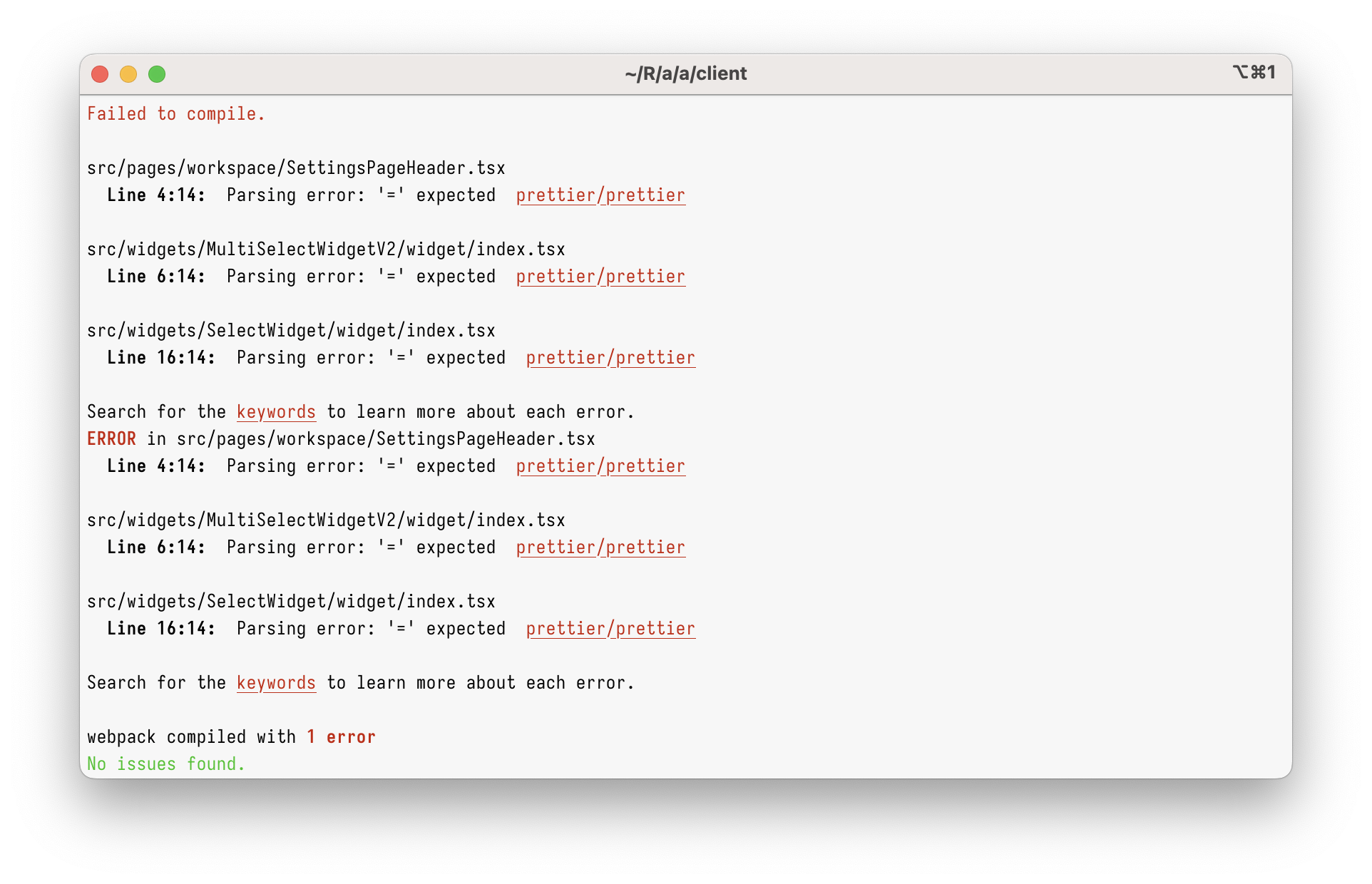
However, just using `import type` in the current codebase will give you
this:

<img width="962" alt="Screenshot 2023-03-08 at 17 45 59"
src="https://user-images.githubusercontent.com/2953267/223775744-407afa0c-e8b9-44a1-90f9-b879348da57f.png">

That’s because Prettier 1 can’t parse `import type` at all. To parse it,
we need to upgrade to Prettier 2.

### Why enforce `import type`?

Apart from just enabling `import type` support, this PR enforces
specifying `import type` everywhere it’s needed. (Developers will get
immediate TypeScript and ESLint errors when they forget to do so.)

I’m doing this because I believe `import type` improves DX and makes
refactorings easier.

Let’s say you had a few imports like below. Can you tell which of these
imports will increase the bundle size? (Tip: it’s not all of them!)

```ts
// app/client/src/workers/Linting/utils.ts
import { Position } from "codemirror";
import { LintError as JSHintError, LintOptions } from "jshint";
import { get, isEmpty, isNumber, keys, last, set } from "lodash";
```

It’s pretty hard, right?

What about now?

```ts
// app/client/src/workers/Linting/utils.ts
import type { Position } from "codemirror";
import type { LintError as JSHintError, LintOptions } from "jshint";
import { get, isEmpty, isNumber, keys, last, set } from "lodash";
```

Now, it’s clear that only `lodash` will be bundled.

This helps developers to see which imports are problematic, but it
_also_ helps with refactorings. Now, if you want to see where
`codemirror` is bundled, you can just grep for `import \{.*\} from
"codemirror"` – and you won’t get any type-only imports.

This also helps (some) bundlers. Upon transpiling, TypeScript erases
type-only imports completely. In some environment (not ours), this makes
the bundle smaller, as the bundler doesn’t need to bundle type-only
imports anymore.

## Type of change

- Chore (housekeeping or task changes that don't impact user perception)


## How Has This Been Tested?

This was tested to not break the build.

### Test Plan
> Add Testsmith test cases links that relate to this PR

### Issues raised during DP testing
> Link issues raised during DP testing for better visiblity and tracking
(copy link from comments dropped on this PR)


## Checklist:
### Dev activity
- [x] My code follows the style guidelines of this project
- [ ] I have performed a self-review of my own code
- [ ] I have commented my code, particularly in hard-to-understand areas
- [ ] I have made corresponding changes to the documentation
- [x] My changes generate no new warnings
- [ ] I have added tests that prove my fix is effective or that my
feature works
- [ ] New and existing unit tests pass locally with my changes
- [ ] PR is being merged under a feature flag


### QA activity:
- [ ] Test plan has been approved by relevant developers
- [ ] Test plan has been peer reviewed by QA
- [ ] Cypress test cases have been added and approved by either SDET or
manual QA
- [ ] Organized project review call with relevant stakeholders after
Round 1/2 of QA
- [ ] Added Test Plan Approved label after reveiwing all Cypress test

---------

Co-authored-by: Satish Gandham <hello@satishgandham.com>
Co-authored-by: Satish Gandham <satish.iitg@gmail.com>
**PRD**:
https://www.notion.so/appsmith/Ability-to-freeze-columns-dd118f7ed2e14e008ee305056b79874a?d=300f4968889244da9f737e1bfd8c06dc#2ddaf28e10a0475cb69f1af77b938d0b

This PR adds the following features to the table widget:

- Freeze the columns to the left or right of the table.(Both canvas and
page view mode).
- Unfreeze the frozen columns. (Both canvas and page view mode).
- Columns that are left frozen, will get unfrozen at a position after
the last left frozen column. (Both canvas and page view mode).
- Columns that are right frozen, will get unfrozen at a position before
the first right frozen column. (Both canvas and page view mode).
- Column order can be persisted in the Page view mode.
- Users can also unfreeze the columns that are frozen by the developers.
- Columns that are frozen cannot be reordered(Both canvas and page view
mode)
- **Property pane changes (Columns property)**:
- If the column is frozen to the left then that column should appear at
top of the list.
- If the column is frozen to the right then that column should appear at
the bottom of the list.
- The columns that are frozen cannot be moved or re-ordered in the list.
They remain fixed in their position.
- In-Page mode, If there is a change in frozen or unfrozen columns in
multiple tables then the order of columns and frozen and unfrozen
columns should get persisted on refresh i.e. changes should get
persisted across refreshes.
* fix: table column name migration update

* test: added test case for migration

* fix: migration version update

* fix: update latest version logic

* fix: cypress updated

* fix: updated test case

* fix: delay added

* fix: test case update

* fix/ one more custom column added
* fix: Table Widget Icon Button should be having a default variant

-- Add update logic for button variant property

* fix: Table Widget Icon Button should have default variant

-- Revert old solution
-- Set default button variant to PRIMARY both in getTableColumns and in propertyConfig

* fix: Table Widget Icon Button should have default variant

-- Change comments for updateIconAlignment utility function
-- Create a migration for button variant

* fix: Table Widget Icon Button should have default variant

-- Remove unused index parameter from forEach statement

* fix: Table Widget Icon Button should have default button variant

-- Fix on misuse of forEach on primaryColumns object

* fix: Table Widget Icon Button should have default variant

-- Change buttonVariant to TERTIARY instead of PRIMARY
* Table widget migration to sanitize keys and binding paths

* added new test case

* modified the logic to sanitize dynamicBindingPathList

* fix calling migrateTableSanitizeColumnKeys on child and fix updating dsl version
* fix: compact mode

* fix: test

* fix: remove row height visibility

* fix: options label for compactMode

* feat: Add test

* Fix: failing test

* fix: test

* fix: test case.

* fix failing test

* fix: move position of rowHeight prop in property pane
Table data was not populating when extra space inside the mustache binding, This is now fixed for list and table widget

* removed return statements from computed values

* list widget responce update

* table data handled return, added migration

* removed unused function

* updatetd rowBinding string generator

* fix failing cypress test

* fix cypress tests
* update green shade and set border-radius 0 for table buttons

* updated color code for assertion

Co-authored-by: Pawan Kumar <pawankumar@Pawans-MacBook-Pro.local>
Co-authored-by: nandan.anantharamu <nandan.anantharamu@thoughtspot.com>
* Fix hidden columns migration

Fix issue where column ids have spaces in them leading to a crash

* Quick fix unit tests

* Remove tableData dependencies from selectedRow and selectedRows
- Each column has more options and can be configured in the property pane instead of the table
- Table level styles can now be set in the property pane
- Property sections are collapsible

Co-authored-by: vicky-primathon.in <vicky.bansal@primathon.in>
Co-authored-by: nandan.anantharamu <nandan.anantharamu@thoughtspot.com>
Co-authored-by: Abhinav Jha <abhinav@appsmith.com>
Co-authored-by: hetunandu <hetu@appsmith.com>