Fixes#23405
Test Plan:
Steps to import an excel file into document viewer:
1. Import a file using file picker widget in base64 format.
2. Bind filepicker.files[0].data to document viewer data.
Test cases to cover
1. Import an .xls file into document viewer and it should work.
2. Import an .xlsx file into document viewer and it should work
3. Import an .xlsx file, verify it renders fine. Changing the file data
to an .xls file. Verify it renders fine without having the need to use
another document viewer widget
## Description

This PR upgrades Prettier to v2 + enforces TypeScript’s [`import
type`](https://www.typescriptlang.org/docs/handbook/release-notes/typescript-3-8.html#type-only-imports-and-export)
syntax where applicable. It’s submitted as a separate PR so we can merge
it easily.

As a part of this PR, we reformat the codebase heavily:
- add `import type` everywhere where it’s required, and
- re-format the code to account for Prettier 2’s breaking changes:
https://prettier.io/blog/2020/03/21/2.0.0.html#breaking-changes

This PR is submitted against `release` to make sure all new code by team
members will adhere to new formatting standards, and we’ll have fewer
conflicts when merging `bundle-optimizations` into `release`. (I’ll
merge `release` back into `bundle-optimizations` once this PR is
merged.)

### Why is this needed?

This PR is needed because, for the Lodash optimization from
7cbb12af88,
we need to use `import type`. Otherwise, `babel-plugin-lodash` complains
that `LoDashStatic` is not a lodash function.

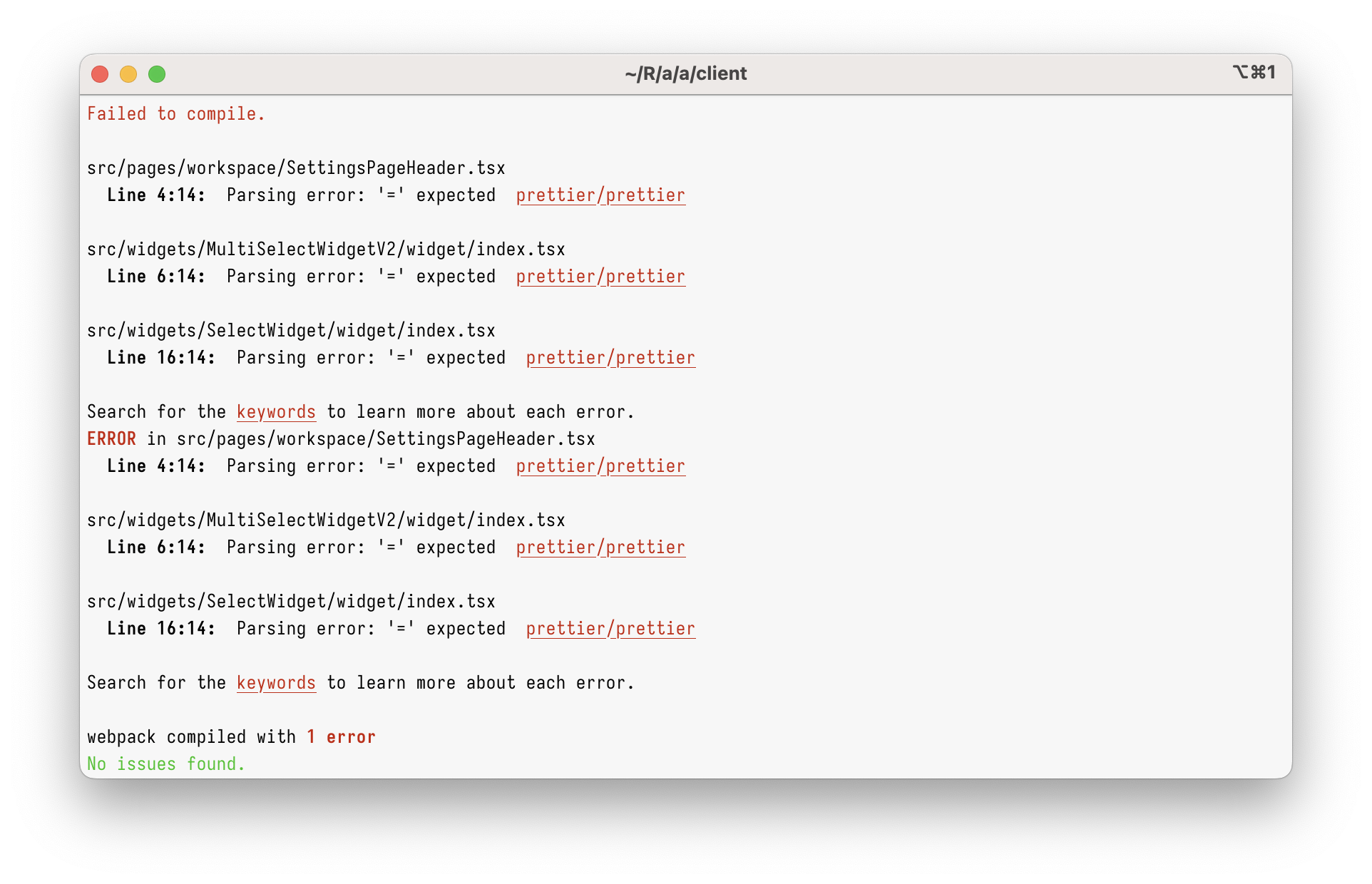
However, just using `import type` in the current codebase will give you
this:

<img width="962" alt="Screenshot 2023-03-08 at 17 45 59"
src="https://user-images.githubusercontent.com/2953267/223775744-407afa0c-e8b9-44a1-90f9-b879348da57f.png">

That’s because Prettier 1 can’t parse `import type` at all. To parse it,
we need to upgrade to Prettier 2.

### Why enforce `import type`?

Apart from just enabling `import type` support, this PR enforces
specifying `import type` everywhere it’s needed. (Developers will get
immediate TypeScript and ESLint errors when they forget to do so.)

I’m doing this because I believe `import type` improves DX and makes
refactorings easier.

Let’s say you had a few imports like below. Can you tell which of these
imports will increase the bundle size? (Tip: it’s not all of them!)

```ts
// app/client/src/workers/Linting/utils.ts
import { Position } from "codemirror";
import { LintError as JSHintError, LintOptions } from "jshint";
import { get, isEmpty, isNumber, keys, last, set } from "lodash";
```

It’s pretty hard, right?

What about now?

```ts
// app/client/src/workers/Linting/utils.ts
import type { Position } from "codemirror";
import type { LintError as JSHintError, LintOptions } from "jshint";
import { get, isEmpty, isNumber, keys, last, set } from "lodash";
```

Now, it’s clear that only `lodash` will be bundled.

This helps developers to see which imports are problematic, but it
_also_ helps with refactorings. Now, if you want to see where
`codemirror` is bundled, you can just grep for `import \{.*\} from
"codemirror"` – and you won’t get any type-only imports.

This also helps (some) bundlers. Upon transpiling, TypeScript erases
type-only imports completely. In some environment (not ours), this makes
the bundle smaller, as the bundler doesn’t need to bundle type-only
imports anymore.

## Type of change

- Chore (housekeeping or task changes that don't impact user perception)


## How Has This Been Tested?

This was tested to not break the build.

### Test Plan
> Add Testsmith test cases links that relate to this PR

### Issues raised during DP testing
> Link issues raised during DP testing for better visiblity and tracking
(copy link from comments dropped on this PR)


## Checklist:
### Dev activity
- [x] My code follows the style guidelines of this project
- [ ] I have performed a self-review of my own code
- [ ] I have commented my code, particularly in hard-to-understand areas
- [ ] I have made corresponding changes to the documentation
- [x] My changes generate no new warnings
- [ ] I have added tests that prove my fix is effective or that my
feature works
- [ ] New and existing unit tests pass locally with my changes
- [ ] PR is being merged under a feature flag


### QA activity:
- [ ] Test plan has been approved by relevant developers
- [ ] Test plan has been peer reviewed by QA
- [ ] Cypress test cases have been added and approved by either SDET or
manual QA
- [ ] Organized project review call with relevant stakeholders after
Round 1/2 of QA
- [ ] Added Test Plan Approved label after reveiwing all Cypress test

---------

Co-authored-by: Satish Gandham <hello@satishgandham.com>
Co-authored-by: Satish Gandham <satish.iitg@gmail.com>
* created new widget

* new lib for document viewer

* added cypress tests

* updated icon

* handling different url types with viewer

* add to ignore react-documents in jest transformIgnorePatterns

* added jest test, updated comments

* required changes

* updated cypress test

* updated icon svg

* doc viewer new renderers added

* comment as required

* updated test case

* added url / base64 validations

* updated url checking condition for space and updated test case

* cypress selector update

* updated url validations

* Merge branch 'release' into feature/new-document-viewer

* lazy load external lib