## Description

This PR upgrades Prettier to v2 + enforces TypeScript’s [`import
type`](https://www.typescriptlang.org/docs/handbook/release-notes/typescript-3-8.html#type-only-imports-and-export)
syntax where applicable. It’s submitted as a separate PR so we can merge
it easily.

As a part of this PR, we reformat the codebase heavily:
- add `import type` everywhere where it’s required, and
- re-format the code to account for Prettier 2’s breaking changes:
https://prettier.io/blog/2020/03/21/2.0.0.html#breaking-changes

This PR is submitted against `release` to make sure all new code by team
members will adhere to new formatting standards, and we’ll have fewer
conflicts when merging `bundle-optimizations` into `release`. (I’ll
merge `release` back into `bundle-optimizations` once this PR is
merged.)

### Why is this needed?

This PR is needed because, for the Lodash optimization from
7cbb12af88,
we need to use `import type`. Otherwise, `babel-plugin-lodash` complains
that `LoDashStatic` is not a lodash function.

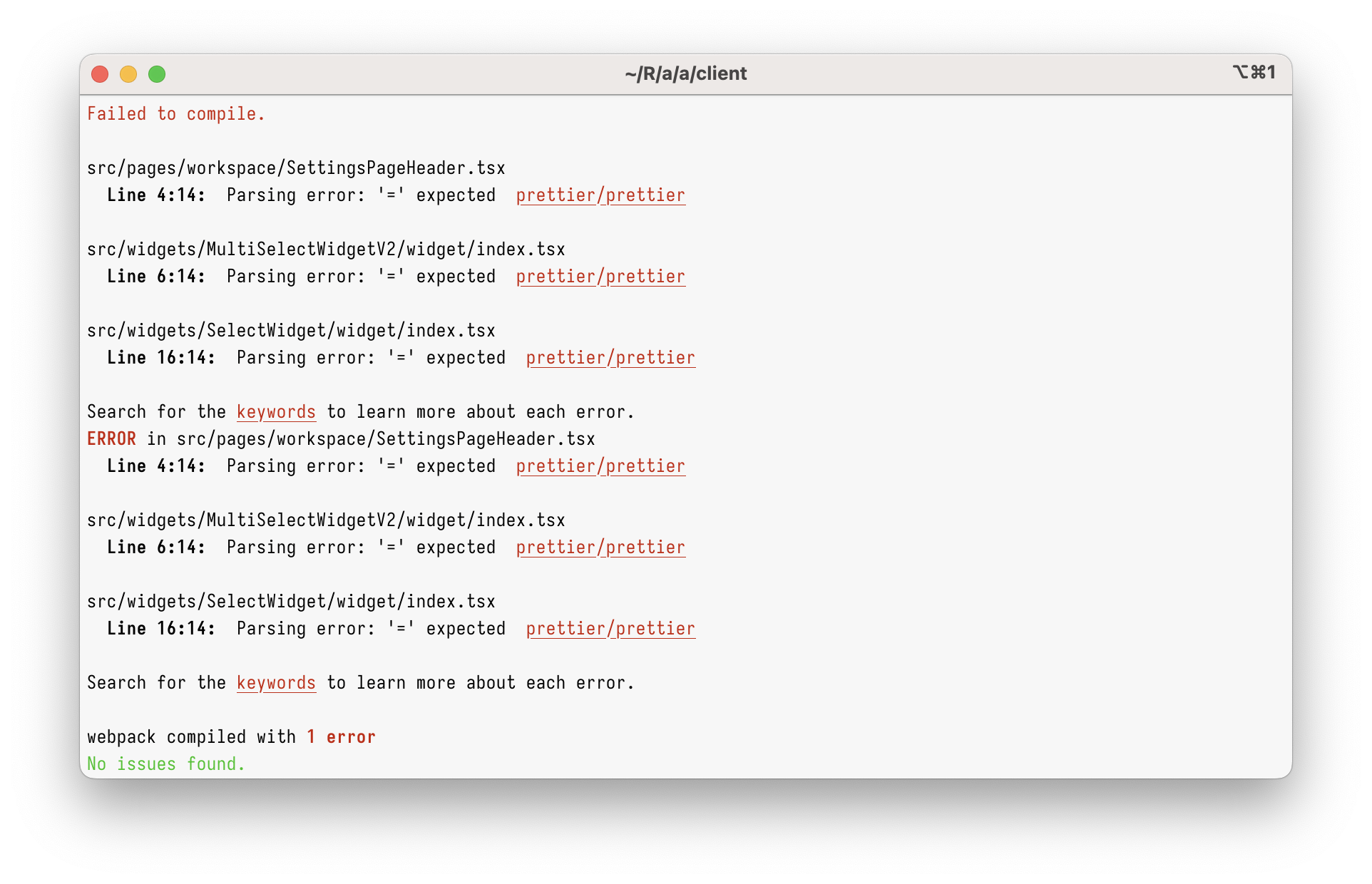
However, just using `import type` in the current codebase will give you
this:

<img width="962" alt="Screenshot 2023-03-08 at 17 45 59"
src="https://user-images.githubusercontent.com/2953267/223775744-407afa0c-e8b9-44a1-90f9-b879348da57f.png">

That’s because Prettier 1 can’t parse `import type` at all. To parse it,
we need to upgrade to Prettier 2.

### Why enforce `import type`?

Apart from just enabling `import type` support, this PR enforces
specifying `import type` everywhere it’s needed. (Developers will get
immediate TypeScript and ESLint errors when they forget to do so.)

I’m doing this because I believe `import type` improves DX and makes
refactorings easier.

Let’s say you had a few imports like below. Can you tell which of these
imports will increase the bundle size? (Tip: it’s not all of them!)

```ts
// app/client/src/workers/Linting/utils.ts
import { Position } from "codemirror";
import { LintError as JSHintError, LintOptions } from "jshint";
import { get, isEmpty, isNumber, keys, last, set } from "lodash";
```

It’s pretty hard, right?

What about now?

```ts
// app/client/src/workers/Linting/utils.ts
import type { Position } from "codemirror";
import type { LintError as JSHintError, LintOptions } from "jshint";
import { get, isEmpty, isNumber, keys, last, set } from "lodash";
```

Now, it’s clear that only `lodash` will be bundled.

This helps developers to see which imports are problematic, but it
_also_ helps with refactorings. Now, if you want to see where
`codemirror` is bundled, you can just grep for `import \{.*\} from
"codemirror"` – and you won’t get any type-only imports.

This also helps (some) bundlers. Upon transpiling, TypeScript erases
type-only imports completely. In some environment (not ours), this makes
the bundle smaller, as the bundler doesn’t need to bundle type-only
imports anymore.

## Type of change

- Chore (housekeeping or task changes that don't impact user perception)


## How Has This Been Tested?

This was tested to not break the build.

### Test Plan
> Add Testsmith test cases links that relate to this PR

### Issues raised during DP testing
> Link issues raised during DP testing for better visiblity and tracking
(copy link from comments dropped on this PR)


## Checklist:
### Dev activity
- [x] My code follows the style guidelines of this project
- [ ] I have performed a self-review of my own code
- [ ] I have commented my code, particularly in hard-to-understand areas
- [ ] I have made corresponding changes to the documentation
- [x] My changes generate no new warnings
- [ ] I have added tests that prove my fix is effective or that my
feature works
- [ ] New and existing unit tests pass locally with my changes
- [ ] PR is being merged under a feature flag


### QA activity:
- [ ] Test plan has been approved by relevant developers
- [ ] Test plan has been peer reviewed by QA
- [ ] Cypress test cases have been added and approved by either SDET or
manual QA
- [ ] Organized project review call with relevant stakeholders after
Round 1/2 of QA
- [ ] Added Test Plan Approved label after reveiwing all Cypress test

---------

Co-authored-by: Satish Gandham <hello@satishgandham.com>
Co-authored-by: Satish Gandham <satish.iitg@gmail.com>
**PRD**:
https://www.notion.so/appsmith/Ability-to-freeze-columns-dd118f7ed2e14e008ee305056b79874a?d=300f4968889244da9f737e1bfd8c06dc#2ddaf28e10a0475cb69f1af77b938d0b

This PR adds the following features to the table widget:

- Freeze the columns to the left or right of the table.(Both canvas and
page view mode).
- Unfreeze the frozen columns. (Both canvas and page view mode).
- Columns that are left frozen, will get unfrozen at a position after
the last left frozen column. (Both canvas and page view mode).
- Columns that are right frozen, will get unfrozen at a position before
the first right frozen column. (Both canvas and page view mode).
- Column order can be persisted in the Page view mode.
- Users can also unfreeze the columns that are frozen by the developers.
- Columns that are frozen cannot be reordered(Both canvas and page view
mode)
- **Property pane changes (Columns property)**:
- If the column is frozen to the left then that column should appear at
top of the list.
- If the column is frozen to the right then that column should appear at
the bottom of the list.
- The columns that are frozen cannot be moved or re-ordered in the list.
They remain fixed in their position.
- In-Page mode, If there is a change in frozen or unfrozen columns in
multiple tables then the order of columns and frozen and unfrozen
columns should get persisted on refresh i.e. changes should get
persisted across refreshes.
* fix: underline style for text
* fix: add expected structure example
* Revert "fix: add expected structure example"
This reverts commit efd56886a26f87bb18cf6edc53bd246bfeb8e0f1.
* fix: test failing
* fix: widget crashing (#6980)
* fix: update omnibar search string for documentation for actions (#6722)
* [Mongo] Added default values for query for Find, Count and Distinct commands (#6960)
* Added smart defaults for query in Count, Distinct & Find commands
* Added test cases for smart inputs for query and limit for find, and query for count and distinct
* Distinct command output now results a JSON object instead of an array of strings (#6964)
* Fix: Break word when text widget content is long (#6211)
fixes#5319
* fix: widget crashing
Co-authored-by: Rishabh Saxena <rishabh.robben@gmail.com>
Co-authored-by: Trisha Anand <trisha@appsmith.com>
Co-authored-by: balajisoundar <sbalaji1192@gmail.com>
Co-authored-by: Rishabh Saxena <rishabh.robben@gmail.com>
Co-authored-by: Trisha Anand <trisha@appsmith.com>
Co-authored-by: balajisoundar <sbalaji1192@gmail.com>
Introducing the **Floating action button / Icon button**. Now you can use this to show small actions as icons. We have added a bunch of styling customisation to this as well. You can bind an onClick action to this and easily trigger an even. The component also automatically resizes within the widget as you scale it while maintaining the right aspect ratio.
* added sniping mode toggle option to header

* added cover to components on hover in sniping mode

* fixed the transition time

* using filled icon

* Show dependencies in action pane

* Added a wrapper to make a widget snipeable

* removed older parts of sniping from Positioned Container

* removed onclick action from snipeable wrapper

* Showing widget name in different color

* Added a mechanism to send user to sniping mode from successful API screen

* created new property pane saga to bind the data

* Fix datasource list width issue

* Fix sidebar going out of view when the response is a table

* Minor refactor

* Show add widgets section on the sidebar

* Stop showing autocomplete option after adding a widget

* fetching pageId, appId from store

* Get suggested widget from response

* Fix table data not getting evaluated after adding binding

* Fix property pane going below the entity explorer while navigating from query/api pane

* Fix width of sidepane shifting for apis

* Fix vertical margins of connections

* Fix api pane suggested widget showing up for errors

* Fix margins

* can show select in canvas btn in sidebar

* can get the action object at the end to bind the data

* updated saga and action names

* can bind data to table

* Use themes

* Use new image url for Table widget

* Added conditional mapping for sniping mode binding.

* updated the widget name tags and seq of calls to open property pane

* pushed all sniping mode decoration to header

* moved setting sniping mode logic to editor reducer

* Added keyboard short cut to get out of sniping mode

* updated reset sniping mechanism

* removed a divider line

* if there are no relationships, will not show the complete section

* Connect Data will automatically show relevant tab in integrations

* Update list and dropdown image urls

* Remove create table button

* no wrapping bind to text

* minor review considerations

* showing the widget name to left in sniping mode

* can set data to datepicker

* will not show snipe btn if there are no widgets in canvas

* Changes for multiple suggested widgets

* removed dependency of sniping from suggested widgets

* Added analytics events for sniping mode

* logic for binding data to a widget, moved to snipeable component

* changed binding widget func from capture to onClick and took care of sniping from widget wrapper too.

* added tests to check sniping mode for table

* updated test spec

* minor fix

* Fix copy changes

* Update test to use table widget from suggested widget list

* if fails to bind will generate warning and keep user in sniping mode

* in sniping mode will only show name plate if it is under focus

* fixed the test case

* added a comment

* minor fix to capture on click event in sniping mode

* updated text

* Hide connections UI when there are no connections

* Increase width to 90%

* Show placeholder text and back button in sidepane

* Show tooltip on hover

* Add analyitcs events for suggested widgets and connections

* Update label based on whether widgets are there or not

* binding related changes

* renamed the saga file containing sinping mode sagas

* Changes for inspect entity

* Revert "binding related changes" temporarily

This reverts commit 54ae9667fecf24bc3cf9912a5356d06600b25c84.

* Update suggested widgets url

* Update table url

* Fix chart data field not getting evaluated

* a minor fix to show proper tool tip when user hovers on widget name

* Show sidepane when there is output

* Update locators

* Use constants for messages

* Update file name to ApiRightPane

* Remove delay

* Revert "Revert "binding related changes" temporarily"

This reverts commit ee7f75e83218137250b4b9a28fcf63080c185150.

* Fix width

* Fix overlap

Co-authored-by: Akash N <akash@codemonk.in>
The filter pane in the table widget was fixed to top which would hinder the viewport for the end user. We have now changed the filter pane to a draggable component such that the user can place it anywhere on the canvas while they apply filters to see data change in realtime.
* FEATURE #4088 : added draggable filterpane for table widget
* FEATURE #4088 : update icons, editMode prop and added renderDragBlock support in popper
* FIX#5329: added close button for close filter pane
* FIX#5332 : updated zindex for table filter pane
* fix list widget test
* Fix drag icon position and cypress failing tests
* Fix endsWidth comparator function
* FEATURE-3261 : Menu Widget

-- Perform initial onboarding of the widget, not completed

* FEATURE-3261 : Menu Widget

-- Create a menuItemsControl
-- Create the first MVP of IconSelectControl

* FEATURE-3261 : Add Menu Widget

-- Align add menu item button to the center
-- Build icon select control with a grid popup

* FEATURE-3261 : Menu Widget

-- Create a icon alignment control
-- Complete the property pane of the widget

* FEATURE-3261 : Add Menu Widget

-- Implement the body of the widget
-- Bind into the properties from property pane

* FEATURE-3261 : Menu Widget

-- Fix the issues from the first feedback

* FEATURE-3261 : Menu Widget

-- Fix on the 2nd feedback

* FEATURE-3261 : Menu Widget

-- Fix on issues from IconSelectControl, IconAlignControl

* FEATURE-3261 : Menu Button Widget

-- Rename Menu to MenuButton, accordingly refactoring the relevant codes
-- Change some help content
-- Change styles for icon select control, adding padding for search box

* FEATURE-3261 : Menu Button Widget

-- Bind isDisabled property into the UI
-- Prevent input text of menu item from overflowing
-- Add tooltip feature for icon select control
-- Set the height of the popover content dynamically

* FEATURE-3261 : Menu Button Widget

-- Use POPOVER2_TARGET class name for styling
* basic line widget setup

* rename to divider, added icon

* completed divider functionalities

* minor textual updates

* cypress test for divider widget

* tested on local cypress run

* Divider widget jest tests

* basic logic implemented

* arrow head better alignment

* added required svg icons

* divider widget props update

* fix on propertypane dropdown iconSize

* fix capside icon width in property panel

* updated cypress dsl and tests

* minor updates

* cap arrow new implementation

* remove hover animation from divider icon

* updates and optimizations

* moved test class to component
- Each column has more options and can be configured in the property pane instead of the table
- Table level styles can now be set in the property pane
- Property sections are collapsible

Co-authored-by: vicky-primathon.in <vicky.bansal@primathon.in>
Co-authored-by: nandan.anantharamu <nandan.anantharamu@thoughtspot.com>
Co-authored-by: Abhinav Jha <abhinav@appsmith.com>
Co-authored-by: hetunandu <hetu@appsmith.com>
# New Feature: Entity Explorer
- Entities are actions (apis and queries), datasources, pages, and widgets
- With this new feature, all entities in the application will be available
  to view in the new entity explorer sidebar
- All existing application features from the api sidebar, query sidebar, datasource sidebar and pages sidebar
  now are avialable on the entity explorer sidebar
- Users are now able to quickly switch to any entity in the application from the entity explorer sidebar.
- Users can also search all entities in the application from the new sidebar. Use cmd + f or ctrl + f to focus on the search input
- Users can rename entities from the new sidebar
- Users can also perform contextual actions on these entities like set a page as home page, copy/move actions, delete entity, etc from the context menu available alongside the entities in the sidebar
- Users can view the properties of the entities in the sidebar, as well as copy bindings to use in the application.
* Fixed tabs widget bugs and other updates:
1. Moved drag icon to the left of tab name field in the tabs widget property pane
2. Change drag icon
3. Add scroll when the tabs occupy more width than the width of tabs widget.
4. Add selected tab name validation.
5. Hide overflow tabs.
6. Avoid vertical scrollbars in tabs widget header